121clicks.com
  • Home
  • About
  • Popular
    • Inspirations
    • Showcases
    • Photo Stories
    • Tutorials
    • Art
    • Articles & Reviews
    • Interviews
    • Animals
  • Learn
  • Guides
  • Newsletter
  • Contact
No Result
View All Result
121clicks.com
  • Home
  • About
  • Popular
    • Inspirations
    • Showcases
    • Photo Stories
    • Tutorials
    • Art
    • Articles & Reviews
    • Interviews
    • Animals
  • Learn
  • Guides
  • Newsletter
  • Contact
No Result
View All Result
121clicks.com
No Result
View All Result

Black and White Photoshop Conversion Technique

121clicks Team by 121clicks Team
September 23, 2012
in Tutorials
11
Black and White Photoshop Conversion Technique
Share on FacebookShare on Twitter
Follow us on Google News Join WhatsApp Channel Subscribe Newsletter
Written by : 121clicks Team

Know more →

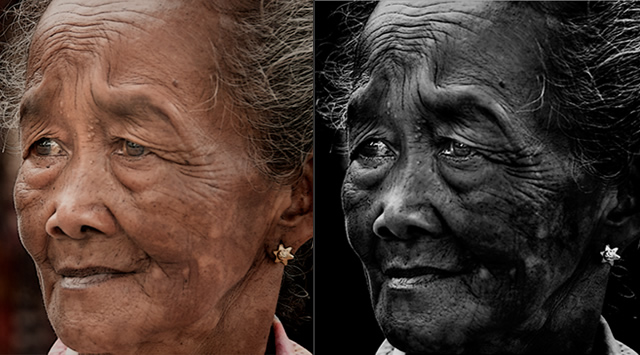
Some time back, we have posted Shirren Lim interview in our blog. I really admired her black and white portraits and ask her the process behind her portraits. She sent her Photoshop Workflow, Here it is. Thanks Shirren.
Black and White Photoshop Conversion Technique

People asks me all the time about my BW portraits … so here’s one of the many ways to get the look.

This is a color photo I’ve prepped for color before converting to B&W.
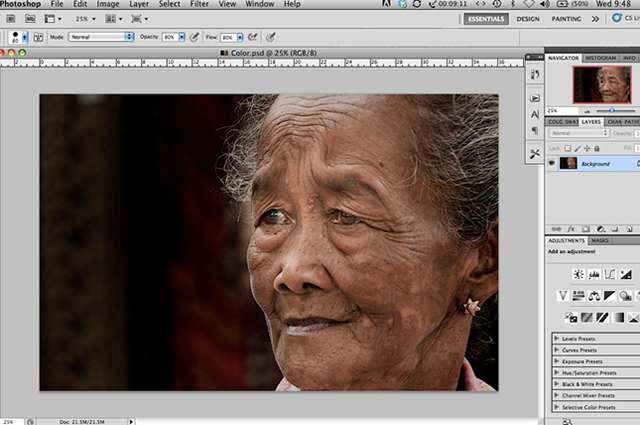
Black and White Photoshop Conversion Technique

1. Black & White conversion

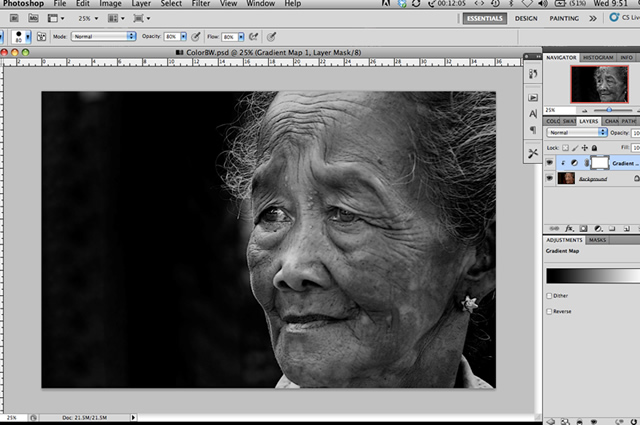
I shoot all my photos in color and then I convert them to B&W. So, much like how you would prep a color photo, you will need to do the same before converting to B&W. Assuming you have done all your white balancing, etc, proceed to convert your image to B&W using Gradient Map: Image > Adjustments > Gradient Map OR B&W conversion : Image > Adjustments > Black & White.
Black and White Photoshop Conversion Technique

The image converted to B&W using Gradient Map.

2. Level, Levels, Levels

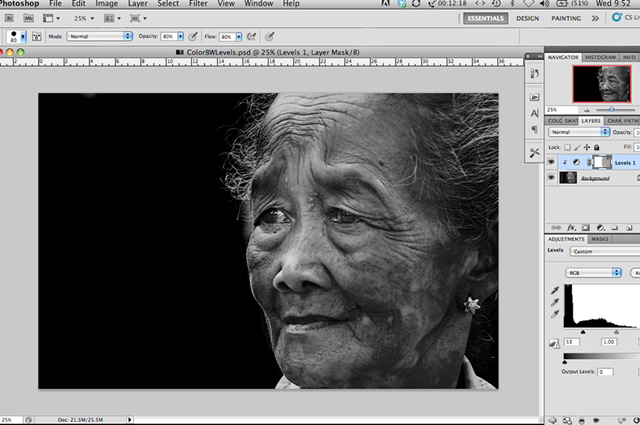
Use the Levels tool : Image > Adjustments >Levels to crush your black and adjust your white.

Don’t worry about the mid points at this moment and don’t worry if your overall image is too dark where the blacks are.

3. Mask!

Just use the mask tool and a soft brush to open the areas where you think the blacks are a bit too much to reveal your image. Do the same for your white areas.  Adjust the opacity to your taste.
Black and White Photoshop Conversion Technique

The image where Levels has been applied and masked. Flatten your image. Now , you might find that your B&W image is still a bit flat.

4. Blend modes

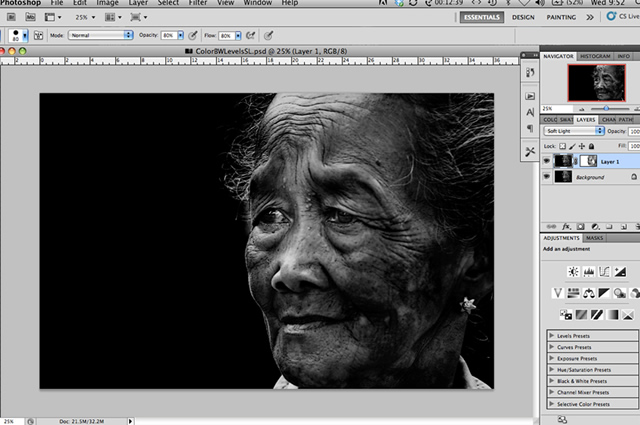
So, duplicate your image : Layer > Duplicate Layer OR Command J (on Mac) and set your Blend mode to Soft Light. You can also try Overlay or Hard Light depending on your image. But I prefer Soft Light best .

Again, adjust the opacity to your taste.

Your image will darken considerably. So, use your mask tool again and open up key areas where you want to highlight – face, eyes , etc, etc.

Flatten your image.
Black and White Photoshop Conversion Technique

Here, Soft Light blend mode has been applied and key areas masked.

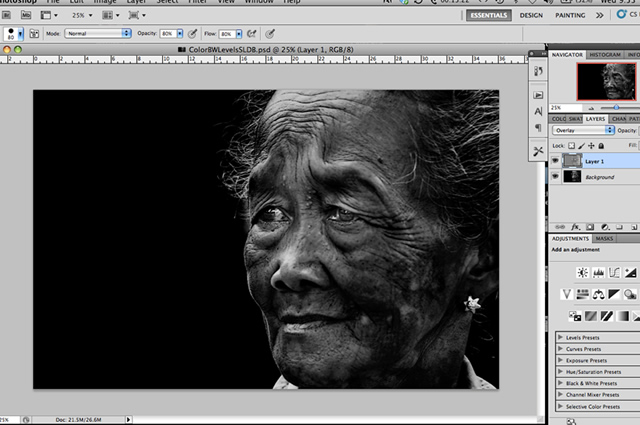
5. Dodge and burn

Here’s where my two favourite tools come in handy.

Leave your background layer as is but go to: Layer > New Layer > set the mode to Overlay > and click on Fill with Overlay – neutral color 50% gray) > OK

Then use the dodge and burn on this layer and not on your background layer. Anything happens , you wouldn’t have dodge and burn on your background layer.

Flatten your image.
Black and White Photoshop Conversion Technique

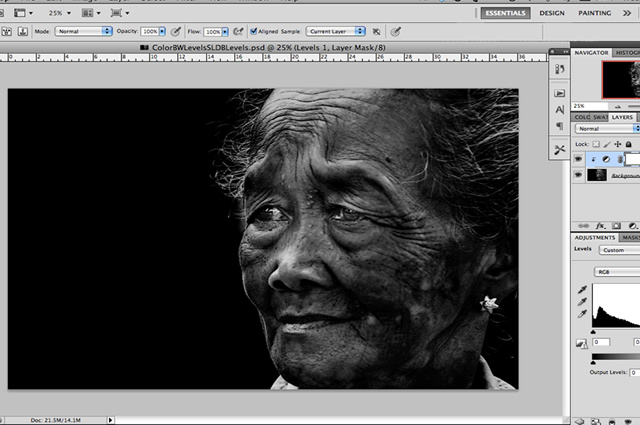
6. Levels. One more time

Depending on the image,  I will use the Levels tool again and adjust the midlevels only ….sometimes a minor adjustment in your midtones is all that takes to make the difference.
Black and White Photoshop Conversion Technique

As an example, here’s where I’ve adjusted the midtones.

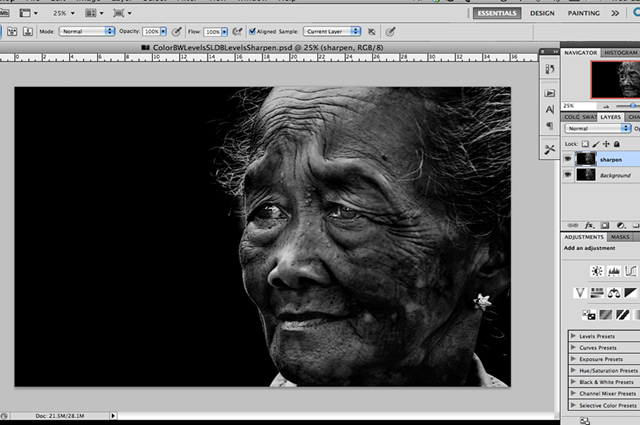
7. Sharpening

As a final step, apply a light sharpening to your overall image.

Filter > Sharpen > Unsharp Mask
Black and White Photoshop Conversion Technique

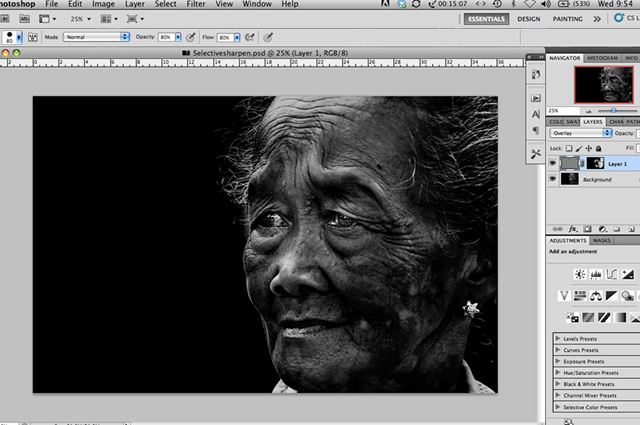
8. Selective high pass sharpening

For this image, I applied a further sharpening which is the selective sharpening using the High Pass mode.

Filter > Other  > High Pass and set a small radius like 5.

From here, turn your mask to black and use a white soft brush to lightly sharpen the rims of the eyes, nose, hair, etc, etc . This will make the image pop a little further.

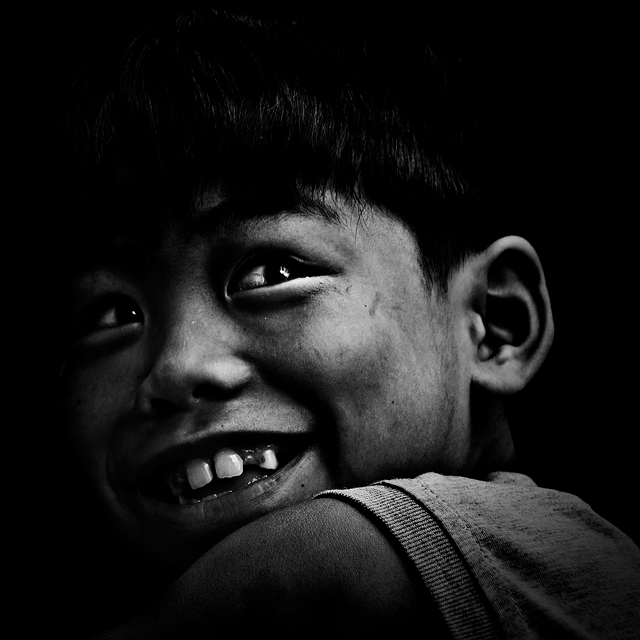
Final Image
Black and White Photoshop Conversion Technique

Flatten your image and viola!

Hope you enjoy this tutorial and have fun.

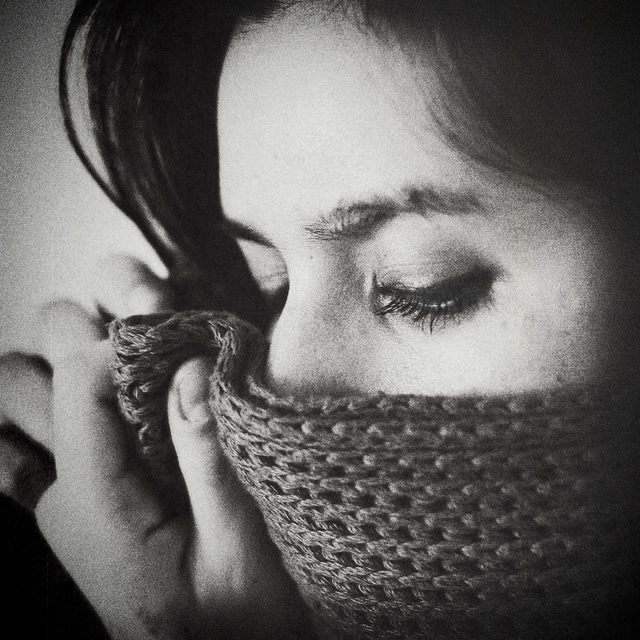
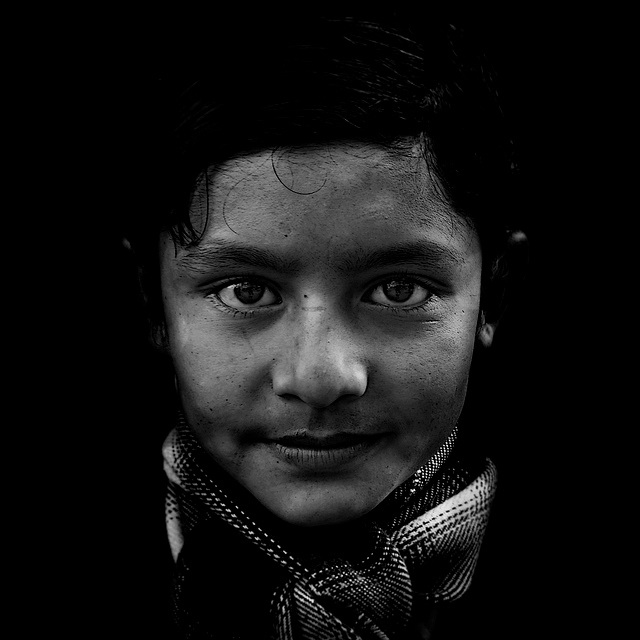
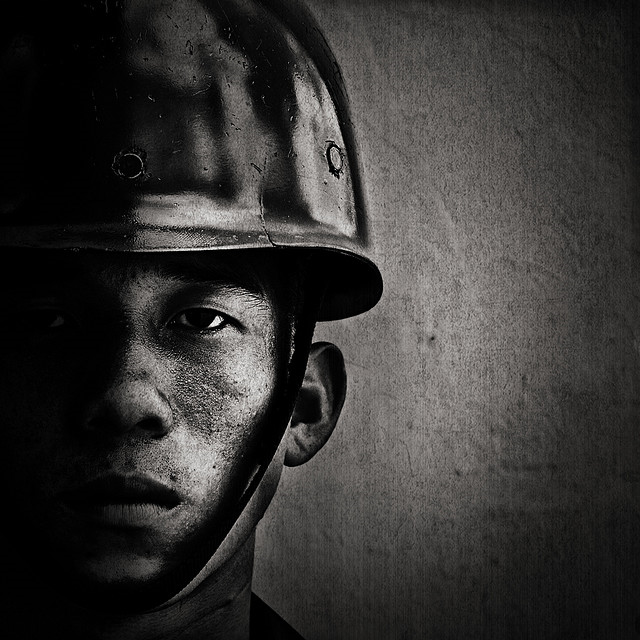
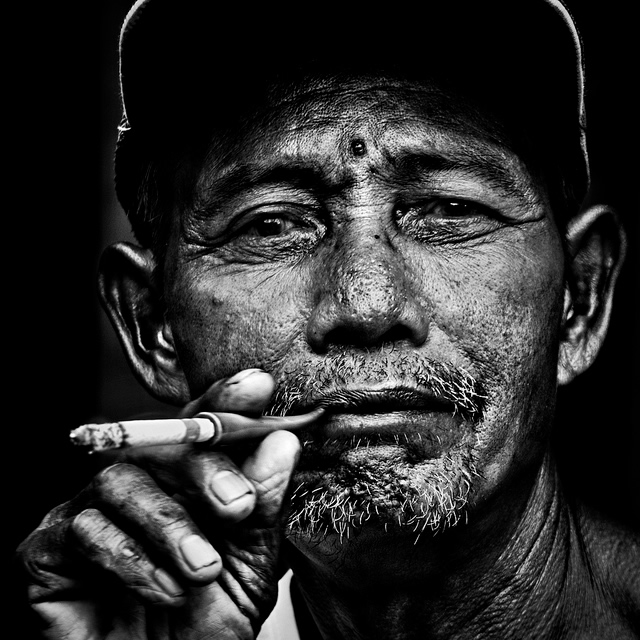
Some of Shirren’s Portraits
Black and White Photoshop Conversion Technique

Black and White Photoshop Conversion Technique

Black and White Photoshop Conversion Technique

Black and White Photoshop Conversion Technique

Black and White Photoshop Conversion Technique

You can find Shirren on the Web :

Flickr         : www.flickr.com/photos/shirrenlim/
Facebook  : www.facebook.com/shirrenlim
Tags: Learning & TutorialsPhotoshopPhotoshop & Post ProcessingTips
Previous Post

Showcase of the Week – Ashok Saravanan

Next Post

Interview with Dan from McClanahan Studio

Related Posts

Winners of 35AWARDS Tell Us About the Future of Phone Cameras
Inspirations

The Mobile Revolution: What the Winners of 35AWARDS Tell Us About the Future of Phone Cameras

...

by Marcus Thorne
June 15, 2026
The Geometry of Light - Master Photographers Use Chiaroscuro in Modern Street Photography
Inspirations

The Geometry of Light: How Master Photographers Use Chiaroscuro in Modern Street Photography

...

by Oliver St. John
June 14, 2026
Mastering Black and White Portrait Photography
Inspirations

Mastering Black and White Portraiture: 32 Soulful Portraits That Teach You to Shoot Like a Pro

...

by Oliver St. John
May 23, 2026
Cinematic Street Photos Filled With Drama and Mystery
Inspirations

Art of Visual Storytelling: 32 Cinematic Street Photos Filled With Drama and Mystery

...

by Oliver St. John
May 18, 2026
Light and Shadow Street Photos Shoot Like a Pro
Inspirations

Chasing Light and Shadow: 31 Street Photos That Teach You How to Shoot Like a Pro

...

by Oliver St. John
May 4, 2026
Mastering Bird Photography Teach You to Shoot Like a Pro
Inspirations

Mastering Bird Photography: 30 Stunning Photos That Teach You to Shoot Like a Pro

...

by Oliver St. John
April 30, 2026
The Art of Macro Photography
Inspirations

The Art of Macro Photography: 33 Insect Photos That Teach You to Shoot Like a Pro

...

by Oliver St. John
April 20, 2026
Minimalist Photos That Showcase Geometry, Color, and Composition
Inspirations

30 Minimalist Photos That Showcase Geometry, Color, and Composition

...

by Oliver St. John
April 17, 2026
Load More
Next Post
Interview with Dan from McClanahan Studio

Interview with Dan from McClanahan Studio

Please login to join discussion

Subscribe to Our Newletter

Subscription Form

Recent Posts

  • Unseen Beauty of Insects: 33 Macro Photos by Janek Stolarczyk Captured with a Smartphone
  • Celebrating the Wild: 42 Winning Nature Photos From the Academy Photo Awards 2026
  • 15 Dreamlike Iceland Photos by Cath Simard That Feel Straight Out of a Fairytale
  • Life Is Better With Cats: 40 Funny, Cute, and Totally Relatable Photos
  • A Journey Through America: 35 Historical Photos Packed With Untold Stories
121clicks.com

121clicks.com is a global platform celebrating the art of photography, showcasing inspiring works from talented photographers around the world.

Connect With Us

Recent Posts

Macro Photos by Janek Stolarczyk Captured with a Smartphone

Unseen Beauty of Insects: 33 Macro Photos by Janek Stolarczyk Captured with a Smartphone

June 28, 2026
Academy Photo Awards 2026 Nature Winners

Celebrating the Wild: 42 Winning Nature Photos From the Academy Photo Awards 2026

June 28, 2026

Other Categories

  • Animals
  • Art
  • Articles & Reviews
  • Design
  • Funny
  • Interviews
  • Tutorials
  • About Us
  • DMCA REMOVAL
  • Privacy Policy
  • Terms & Conditions
  • Gemini Prompts

© 2026 121Clicks.com - All rights reserved.

No Result
View All Result
  • Home
  • About
  • Popular
    • Inspirations
    • Showcases
    • Photo Stories
    • Tutorials
    • Art
    • Articles & Reviews
    • Interviews
    • Animals
  • Learn
  • Guides
  • Newsletter
  • Contact

© 2026 121Clicks.com - All rights reserved.