
In the digital age, clear and high-quality images are essential for making a strong impression. From enhancing professional portfolios to improving e-commerce product photos, the quality of your images can significantly impact your success. Traditional methods of image enlargement often lead to poor results, such as blurriness or pixelation. Fortunately, advancements in artificial intelligence (AI) have provided a more effective solution: AI image upscaling. This guide explores how to use AI upscaling to achieve exceptional image clarity and quality.
Understanding AI Image Upscaling
What is AI Image Upscaling?
AI image upscaling refers to the use of artificial intelligence technology to increase the resolution and improve the quality of images. Unlike traditional upscaling techniques, which simply stretch or interpolate pixels, AI upscaling leverages advanced algorithms to predict and add new details. This process results in images that are not only larger but also sharper and more detailed.
The Mechanics of AI Upscaling
AI upscaling operates through sophisticated neural networks that are trained on extensive datasets of images. These networks learn to identify and replicate intricate patterns and textures, allowing them to reconstruct images at higher resolutions with greater accuracy. When an image is processed through an AI upscaling tool, the algorithm analyzes existing pixels, infers additional details, and produces an enhanced image.
How to Enhance Your Images with AI Upscaling
Step 1: Choose the Right AI Upscaling Tool
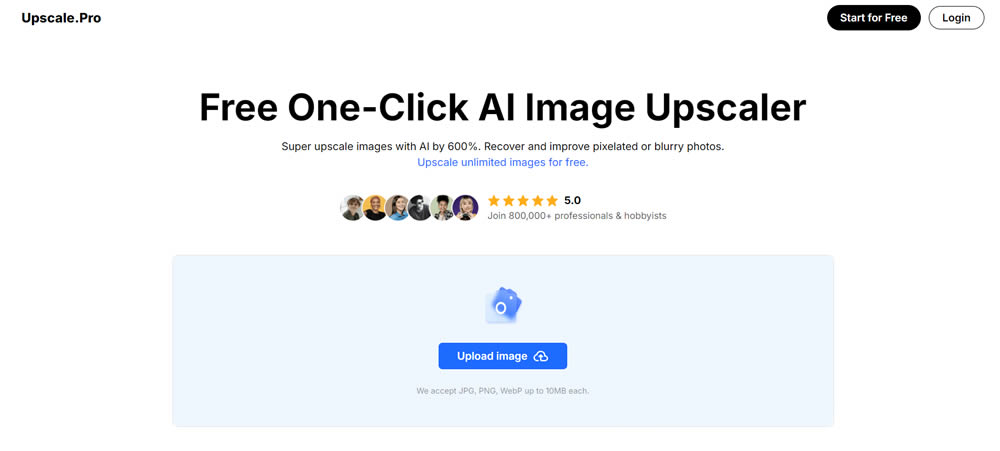
Selecting an appropriate AI upscaling tool is crucial for obtaining the best results. Upscale.Pro is a powerful AI tool for upscale images by up to 600% while preserving and enhancing detail. With features tailored to various needs, Upscale.Pro is suitable for professionals and hobbyists alike.
Step 2: Prepare Your Images for Upscaling
Preparation is key to achieving optimal results with AI upscaling. Ensure your images are in a supported format such as JPG, PNG, or WebP, and keep the file size under 10MB. Although AI upscaling can improve images of lower resolution, starting with the highest quality image available will yield better results. Clean up your images by removing any noticeable defects or noise before uploading.
Step 3: Upload Your Image
Once your image is ready, the next step is to upload it to the AI upscaling tool. On Upscale.Pro, this is a simple process: click the upload icon, select your image file, and initiate the processing. The tool will apply its AI algorithms to enhance the image, resulting in a higher-resolution output.
Step 4: Adjust Upscaling Settings
AI upscaling tools often come with a range of customization options. Upscale.Pro, for instance, provides several features to tailor the enhancement process:
- Upscale by Up to 600%: Significantly enlarge your image while maintaining or improving clarity.
- Enhance Blurry Images: Sharpen images that appear pixelated or out of focus.
- Reduce Noise: Eliminate noise and grain from images taken in low-light conditions.
- Restore Aged Photos: Bring life back to old or damaged photographs by revealing hidden details.
- Correct Night Scene Exposure: Adjust exposure and color balance in nighttime images.
Improve Anime/Cartoon Images: Enhance small or blurry cartoon and anime images for clearer visuals.
Step 5: Review and Save the Enhanced Image
After the upscaling process is complete, carefully review the enhanced image to ensure it meets your quality expectations. The upscaled image should be clearer and more detailed compared to the original. If satisfied with the results, download the image for use in your projects.
Advantages of Using AI Image Upscaling
Improved Image Quality
AI upscaling technology provides a significant advantage by enhancing image resolution while preserving or even improving detail. This results in images that are sharper and more visually appealing.
Broad Application
AI upscaling is versatile and can be used for various types of images, including photographs, graphics, and digital artwork. This makes it a valuable tool for a wide range of professionals, from photographers and graphic designers to e-commerce businesses.
Time Efficiency
AI upscaling tools streamline the image enhancement process, allowing users to upscale multiple images quickly and efficiently. This is particularly useful for managing large volumes of images and improving workflow efficiency.
Enhanced Visual Appeal
High-quality images are essential for capturing attention and engaging audiences. AI upscaling ensures that images are visually striking and suitable for high-resolution displays, prints, and digital content.
Best Practices for Effective AI Image Upscaling
Use High-Quality Source Images
For the best results, start with the highest resolution source image available. While AI upscaling can improve lower-resolution images, beginning with a higher-quality original will enhance the final output.
Experiment with Features
Take full advantage of the customization features offered by AI upscaling tools. Experiment with different settings to find the best enhancements for your specific needs and image types.
Keep Tools Updated
AI technology is continually advancing. Regularly updating your AI upscaling tool ensures you benefit from the latest improvements and features, keeping your images at the forefront of quality.
Apply AI Upscaling Judiciously
AI upscaling is ideal for enhancing digital images. Use it when you need to improve the resolution of low-quality images or prepare them for high-resolution applications. Avoid overusing the tool for already high-quality images where the benefits may be minimal.
Conclusion
AI image upscaling represents a significant leap forward in image enhancement technology. By utilizing advanced AI algorithms, tools like Upscale.Pro offer an effective solution for increasing image resolution and quality. Whether for professional projects or personal use, understanding how to leverage AI upscaling can greatly improve the clarity and impact of your images. By following the steps outlined in this guide and adhering to best practices, users can achieve remarkable results and elevate their visual content to new heights.
Related Articles:
- Artist Omid Asadi Creates Beautiful Leaf Art With Dried Leaves
- Artist Kanat Nurtazin Creates Marvelous Leaf Cutout Art That Reveals Hidden Stories
- Genetic Diversity: Artist Nayan Shrimali Depicts The Beauty Of Albinism And Melanism
- Artist Chris Judge Creates Funny Doodles Of Clouds That Makes Everybody Smile