


If you’ve been doing your digital SLR homework, you’ve probably read some debate about the merits of RAW vs. JPEG. Let us see some examples and process about RAW and JPEG
What is RAW?
Raw Images are unprocessed Data
If you have a digital SLR camera, you will have come across the term “RAW image” many times. “RAW” means that the image data is in its original form and has not yet been processed any way (by being compressed, for example).
High Quality
A RAW image consists of 12-bit data, while JPEG images contain only 8-bit data. Because RAW images are made up of the recorded output from the camera’s image sensors with no-processing, they contain large amounts of data. You can then fine-tune that data from your computer to “post process” the image in any way you like.
Getting exactly what you want
Images shot in JPEG format are processed by a dedicated image-processing engine inside the camera based on the camera settings. But RAW image files are transferred directly to the computer without processing where they can then be edited using an image adjustment (or processing) to obtain the desired outcome.
The Flexibility of RAW
In addition, many of the camera settings which were applied to the raw data can be undone when using the RAW processing software. For instance, sharpening, white balance, levels and color adjustments can be undone and recalculated based on the raw data. Also, because RAW has 12 bits of available data, you are able to extract shadow and highlight detail which would have been lost in the 8 bits/channel JPEG or TIFF format.
Advantages of RAW
- No image data is lost
- Provide you with plenty of flexibility when deciding how the final image looks
- Allow you to correct mistakes made at the time of exposure
Disadvantages of RAW
- Uncompressed images create very large files
- Require special programs to convert into the JPG format
- Require powerful computers to view and edit
- Can’t be instantly e-mailed or uploaded to online galleries
- Require time and effort to “develop”
Most Popular RAW Conversion / Processing Softwares
Since each camera produces a slightly different file format for RAW, there are only a handful of programs that can interpret them:
- Adobe Photoshop Elements
- Adobe Photoshop CS versions
- Adobe Lightroom
- Apple Aperture
- GIMP
- Google Picasa
File Name Extensions of RAW in different Cameras
- Hasselblad – .3fr
- ARRIFLEX – .ari
- Sony – .arw .srf .sr2
- Casio – .bay
- Canon – .crw .cr2
- Phase One – .cap .iiq .eip
- Kodak – .dcs .dcr .drf .k25 .kdc
- Adobe – .dng
- Epson – .erf
- Imacon – .fff
- Mamiya – .mef
- Leaf – .mos
- Minolta – .mrw
- Nikon – .nef .nrw
- Olympus – .orf
- Pentax – .ptx .pef
- Logitech – .pxn
- RED – .R3D
- Fuji – .raf
- Panasonic – .raw .rw2
- Leica – .raw .rwl .dng
- Rawzor – .rwz
- Sigma – .x3f
What is JPEG
Most Popular RAW Conversion / Processing Softwares
The most commonly used digital image format is JPEG (Joint Photographic Experts Group). Universally compatible with browsers, viewers, and image editing software, it allows photographic images to be compressed by a factor 10 to 20 compared to the uncompressed original with very little visible loss in image quality.
Advantages of JPEG
- Small file sizes maximize memory card and hard drive space
- Easy to view and edit with any image editing program
- Easy to modify to e-mail to friends
- Easy to upload to online galleries
Disadvantages of JPEG
- Less control over the way the final image appears
- Compressed files lose some image data
- Harder to correct mistakes of color and exposure
When to shoot in JPEG
The main reason to shoot JPEG is that you get more shots on a memory card and it’s faster, both in camera and afterwards. If you shoot RAW files you have to then convert them to TIFF or JPEG on a PC before you can view or print them. If you have hundreds of images, this can take some time. If you know you have the correct exposure and white balance as well as the optimum camera set parameters, then a high quality JPEG will give you a print just as good as one from a converted RAW file, so you may as well shoot JPEG.
The Process of RAW vs JPEG
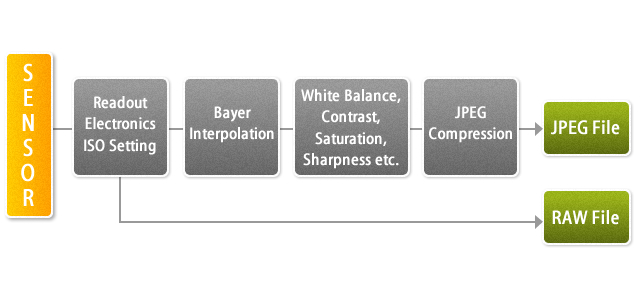
Example of RAW vs JPG Photos and Processing

Photo By : Rachel Lusky
Video Tutorials
RAW vs JPG: 4 Reasons to Shoot RAW Over JPG
Raw vs. JPG or TIFF files: Photoshop CS5 for Photographers
Photography Raw vs Jpeg
Shooting in RAW versus JPEG
Conclusion
which one you prefer RAW or JPEG? Why? Please drop your feedback in Comment section.
