

“The most part of my favorite Julia Roberts’ ‘Notting Hill’ plays fine, but after an hour of smooth play,140seconds audio goes out of sync with the visuals. How can I fix the audio sync problem in the movie saved on my computer?”
Something as obvious as lip-sync in a movie can become immensely annoying when it is not in place. Abrupt lip-syncing, out-of-sync, audio lag, or missing sound in a video can ruin your experience. It is definitely unacceptable and so you may want to fix audio and video sync problem in your favorite video.
But how?
You might not have the technical knowledge to fix videos and you are looking for the best ways to do the task? Addressing the problem, here we bring the various methods to fix audio and video sync issues.
How to fix audio and video sync in Videos
- Sync audio and video in VLC Media Player
- Sync using Video EditingPrograms
- Use Avidemux to fix Audio Sync
- Use a Video Repair Tool to sync audio and video
1. Sync audio and video in VLC Media Player
Out-of-sync or audio lag can well be tackled by using free and open source VLC Media Player. But before you begin, know its limitation too —VLC Player is a temporary solution as you cannot save the settings that fix the audio lag. Every time you open the video in VLC, you will have to fiddle with the settings to fix the audio lag. So if you are looking to fix audio and video sync permanently, VLC Player is not the option. However, it is the useful method worth trying, as you can at least play your videos right away without audio sync issues.
Follow the below steps to fix audio sync issue in VLC Media Player
- Open your video file in VLC
- Select Tools> Track Synchronization
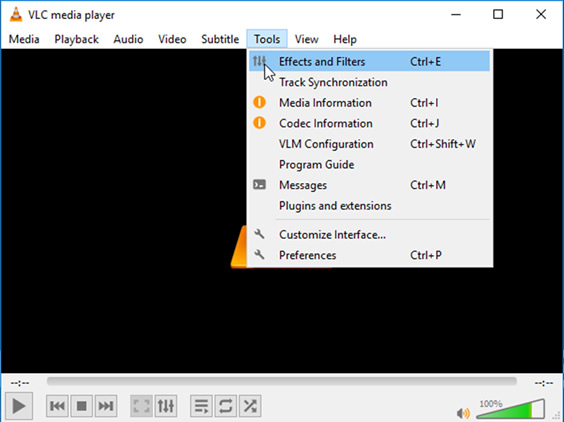
- Under Audio/Video section across ‘Auto track synchronization’ adjust the audio time. Note:Increase the time if the audio plays before the visualand decrease if it plays after the visual.
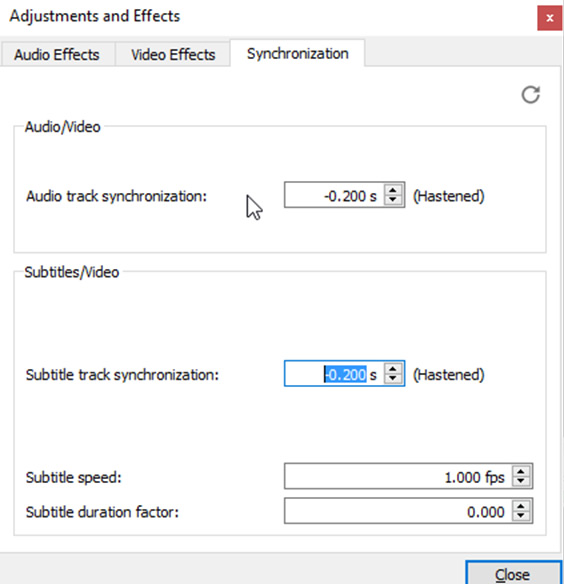
Note:You can adjust the settings using shortcut keys on your keyboard as well. Press K, to slow down your audio and J if the audio lags behind the visual. On Mac computer, use G and F key for the purpose.
2. UseAvidemux to fix Audio Sync
When it comes to open-source tools to fix audio lag, Avidemux can’t be ignored. The free tool is designed to do basic video editing tasks such as cut, edit, convert, audio sync, and filter. Unlike VLC Media Player, you can fix the audio lag in the video file and save it on your computer.
Avidemux works on popular video files such as AVI, MP4, ASF, MKV, FLV etc.
Steps to fix audio lag in a video file using Avidemux
- Open the problem video file in Avidemux
- Set the ‘Video Output’ to ‘Copy’
- Set ‘Audio Output’to ‘Copy’
- Set correct ‘Output Format’
Note: If you copied AVI file set Output format to AVI Muxer; if it’s an MP4 file, set it MP4 Muxer and so on.
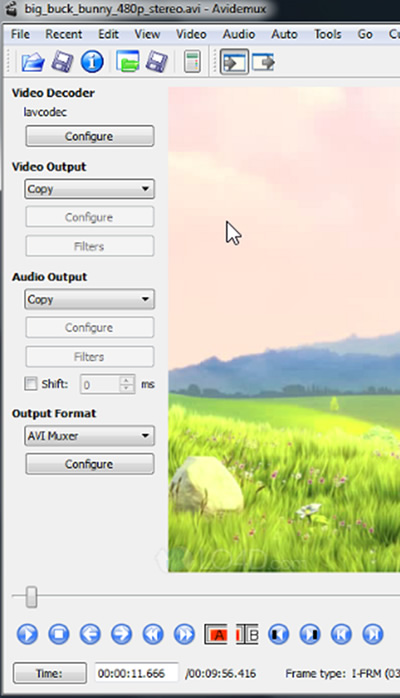
- Check in the ‘Shift’ option and enter the positive/ negative value to fix the audio problem.
Note: If the audio is faster than visual, enter a negative value. If it lags behind the video and you want to increase its speed, enter the positive value. For example, -200 value, will load audio200 milliseconds before while +200 value will load the audio 200 milliseconds after. Play the video to check if the audio sync is achieved. If not, again set the values until you get it right. - Now to save the video clip go to File> Save> Save Video
3. Sync Audio by using Video Editing program
Professional Video Editing programs such as Adobe Lightroom, Lightworks, Premier Pro, Final Cut Pro, or DaVinci Resolve have the provision to fix audio sync issues. They provide synchronization options like merge clips or manual syncing wherein you can mix the audio video clips to get theperfect audio playback.
Use the Video Editing programs and experiment with the settings to get the perfect audio and video sync. You can take the help of free online tutorials available for this software.
The professional editing programs are efficient in fixing audio lag problems. However, on the flip side, they are time taking and require a lot of expertise to get the best results. Not to forget, the price factor, which is also a bit steep.
4. Use a video repair tool to sync audio and video
Video repair software is popularly used to fix various types of corruption issues in the video files. Some advanced tools such as Stellar Repair for Video can fix out-of-sync, audio lag, missing sound problems as well. Compared to Video Editing programs, it is fast and easier to use. Simply download the software on your Mac or PC. Add the problem video file in the software interface, click ‘Repair’ followed by ‘Save’.
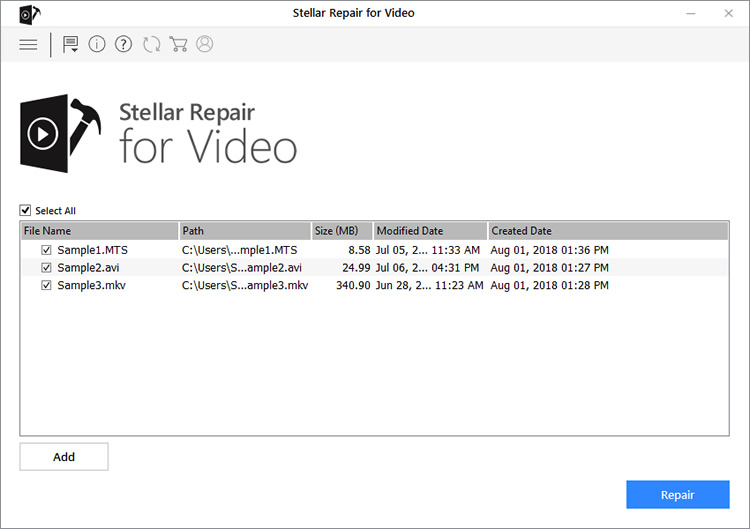
You can also ‘Preview’ the repaired video before saving it.
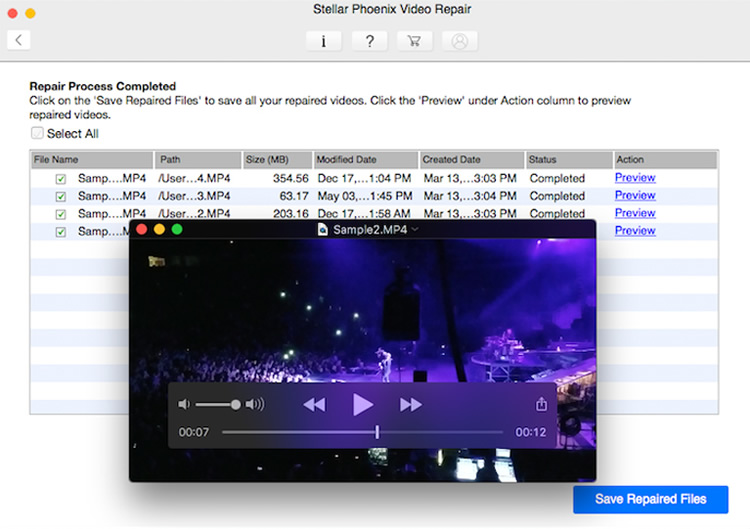
The software can fix audio or video lag in videos from Android, smartphone, iPhone, iPad, DSLR, digicam, security camera, dashcam etc. It can work effectively on both 4K UHD movies and short video clips.
Wrapping Up
Open source tools like VLC Media Player and Avidemux are must-try whenever you want to fix audiovisual synchronization issue. Though not always, but most of the time they have proved to be successful.
On the other hand, the video editing programs are more powerful with several features including audio synchronization. But you should be proficient in the software to get the perfect audio sync in the video. The easier and quick approach to fix audio sync problem in your videos, is to use an advanced video repair software. This method lets you fix multiple out-of-sync video files simultaneously. But remember, a video repair software is not an editing tool. It fixes audio sync problems and corruption but doesn’t edit, crop, merge or filter your videos.
Don’t miss to check: