121clicks.com
  • Inspirations
  • Showcases
  • Photo Stories
  • Others
    • Tutorials
    • Art
    • Articles
    • Interviews
    • Animals
    • Funny
    • Design
  • Pages
    • About 121Clicks.com
    • Contact Us
    • DMCA REMOVAL
    • Privacy
    • Gemini Prompts
No Result
View All Result
121clicks.com
  • Inspirations
  • Showcases
  • Photo Stories
  • Others
    • Tutorials
    • Art
    • Articles
    • Interviews
    • Animals
    • Funny
    • Design
  • Pages
    • About 121Clicks.com
    • Contact Us
    • DMCA REMOVAL
    • Privacy
    • Gemini Prompts
No Result
View All Result
121clicks.com
No Result
View All Result

How to take HDR (High Dynamic Range) Photos

121clicks by 121clicks
February 21, 2018
in Tutorials
4
How to take HDR (High Dynamic Range) Photos
Share on FacebookShare on Twitter

In image processing, computer graphics, and photography, high-dynamic-range imaging (HDRI or just HDR) is a set of techniques that allow a greater dynamic range of luminance between the lightest and darkest areas of an image than current standard digital imaging techniques or photographic methods. This wide dynamic range allows HDR images to more accurately represent the range of intensity levels found in real scenes, ranging from direct sunlight to faint starlight.

The two main sources of HDR imagery are computer renderings and merging of multiple photographs, the latter of which in turn are individually referred to as low-dynamic-range (LDR) or standard-dynamic-range (SDR) photographs.

Tone-mapping techniques, which reduce overall contrast to facilitate display of HDR images on devices with lower dynamic range, can be applied to produce images with preserved or exaggerated local contrast for artistic effect.

What you need :

  1. Digital Camera (with ability to change exposure settings)
  2. Tripod (not required but highly recommended)
  3. Photoshop or PhotoMatrix computer software

Most modern digital cameras have exposure settings so you should be able to do this even with a normal digital point and shoot camera. SLR cameras usually have a bracketing feature which makes it easier to change the exposure settings automatically. If you are using a point and shoot, you’ll need to find a way to keep the camera as steady as possible when changing settings.

Qucik Tips :

  1. When do you decide if you really have to make a HDR pic? If a scene that you are looking at has a dynamic range larger than your camera can capture. Simply put if you eyes goes just gaga over to adjust to different intensity of light and dark spots then its definitely a HDR scene.
  2. Fixing Sky in HDR: Lot of times when working on pictures with Sky especially mid day sky, the sky turns out to be a strange color. This is mostly due to the Halo effect. In such cases move your Luminosity in your tone mapping towards the right or remix the tonemapped picture with your original exposure shot for the sky in Photoshop.

I’d recommend using the following settings:

  • Lowest ISO setting (200)
  • Aperture Priority Mode (usually a big [A] on the wheel)
  • 3 exposure settings
    • EV 0 for the first picture
    • EV -2 for the second picture
    • EV +2 for the third picture

After the shoot, download the photos to your computer. Now you can use PhotoMatrix or Photoshop to post process your pictures.

Here are some Post Processing Tutorials :

  • HDR Tutorial – Everything you need to know about HDR Photography
  • HDR in Adobe Photoshop CS5
  • Modern HDR Photography
  • Secrets of Mastering in HDR Photography
  • How to create HDR Photos

Here aree some Video Tutorials:
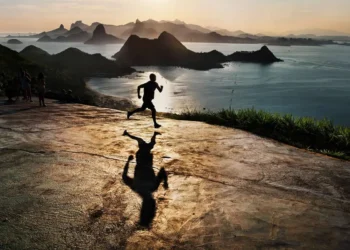
  • Secrets of Amazing HDR Photography
  • Photoshop HDR Tutorial
  • HDR Tutorial Photomatix Pro
Tags: Learning & TutorialsTips
Next Post

50 Free Photography Textures

Related Posts

On the Road With Your Camera Travel Photography
Tutorials

On the Road With Your Camera: How to Plan a Travel Photography Trip Like a Pro

...

by Venkat Prakash
November 17, 2025
Gemini AI Prompts for Portraits
Inspirations

The ‘DSLR Look’ on Your Phone: 5 Gemini AI Prompts to Nail Professional Clarity and Bokeh

...

by Venkat Prakash
October 10, 2025
BigPicture Natural World Photography Competition 2025 Winners
Tutorials

26 Remarkable Winning Photos from the 2025 BigPicture Natural World Photography Competition

...

by 121clicks
June 18, 2025
Tips for Minimalist Landscape Photography to Reveal Beauty in Simplicity
Inspirations

10 Tips for Minimalist Landscape Photography to Reveal Beauty in Simplicity

...

by 121clicks
May 28, 2025
Make Events More Fun with Photo Shoots
Tutorials

6 Ways to Make Events More Fun with Photo Shoots

...

by 121clicks
May 15, 2025
Commercial Photography A Game-Changer for Your Business
Tutorials

Commercial Photography: A Game-Changer for Your Business

...

by 121clicks
May 10, 2025
Common Wedding Videography Mistakes to Avoid on Your Special Day
Tutorials

Common Wedding Videography Mistakes to Avoid on Your Special Day

...

by 121clicks
April 25, 2025
How to Take Amazing Photos for Your Instagram
Tutorials

How to Take Amazing Photos for Your Instagram

...

by 121clicks
April 14, 2025
Load More
Next Post
50 Free Photography Textures

50 Free Photography Textures

Please login to join discussion
121clicks.com

121clicks.com is a global platform celebrating the art of photography, showcasing inspiring works from talented photographers around the world. We bring you breathtaking photo stories, creative tutorials, and expert insights to fuel your artistic journey. Discover, learn, and get inspired — one click at a time.

© 2025 121clicks.com – All rights reserved.

No Result
View All Result
  • Inspirations
  • Showcases
  • Photo Stories
  • Others
    • Tutorials
    • Art
    • Articles
    • Interviews
    • Animals
    • Funny
    • Design
  • Pages
    • About 121Clicks.com
    • Contact Us
    • DMCA REMOVAL
    • Privacy
    • Gemini Prompts

© 2025 121Clicks.com - All rights reserved.